Bet939 register takes under two minutes when you follow the right steps. Open the app, tap Register, enter your phone number and password, verify with an OTP, and your account is live. Simple when you know the order — but several things can go wrong if you skip steps or miss the referral code field.
This guide covers the complete Bet939 registration process — step by step for Android, PC browser and iPhone separately, exactly what information is required and why, how to enter a referral code during signup (this cannot be done after), what to do immediately after registering to claim your welcome bonus and set up CNIC verification, and fixes for the most common registration problems Pakistani players run into.
What You Need to Register
Before starting, make sure you have these ready:
| Requirement | Details | Why It’s Needed |
| Pakistani Mobile Number | Active SIM — any network | OTP verification during signup |
| Password | 6–12 characters, letters + numbers | Secures your account |
| Referral Code (optional) | From whoever invited you | Must be entered during signup — can’t be added after |
| CNIC (after signup) | Submit in account settings | Required before first withdrawal |
| Internet Connection | Mobile data or Wi-Fi | For OTP delivery and signup |
No email address is required to register. Pakistani phone number is the primary identifier and the one used for all OTP verification.
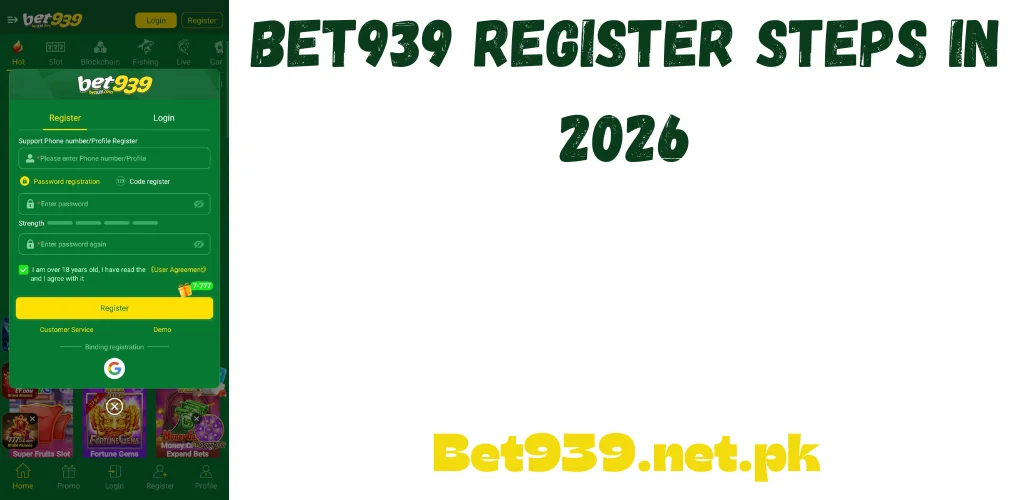
How to Register on Android — Step by Step
Most Pakistani players register through the Android app. Download the APK from bet939games.net.pk first if you haven’t installed it. Then follow these steps:
Bet939 Register Steps on Android
The app moves you to the home screen or dashboard after successful registration. Your account is active and you can access all games from this point.
How to Register on PC
Registering through a PC browser works identically to the app — same fields, same process. Open any browser and go to bet939games.net.pk.
Registration Steps on PC Browser
- Go to bet939games.net.pk in your browser.
- Click Register or Sign Up at the top-right of the homepage.
- Enter your Pakistani mobile number in the field provided.
- Set a strong password.
- Enter a referral code if you have one — same rule applies: it cannot be added after this step.
- Click Send Code and enter the OTP from your SMS.
- Click Register. Your account is ready.
Log in immediately after registering to verify everything works correctly. Then check the promotions section for your welcome bonus before doing anything else.
How to Register on iPhone
No dedicated iOS app exists. iPhone users register through Safari browser on bet939games.net.pk. The registration form is identical to the PC browser version.
- Open Safari on your iPhone and go to bet939games.net.pk.
- Tap Register at the top of the page.
- Enter your mobile number, create a password and enter your referral code if you have one.
- Tap Send OTP and enter the code from your SMS.
- Tap Register. Your account is created.
After registering on iPhone, add bet939games.net.pk to your home screen via Safari’s Share button — Add to Home Screen. This gives you one-tap access to the platform from your iPhone home screen, similar to an app shortcut.
Entering a Referral Code During Registration — The Step Most Players Miss
The referral code field appears during the registration form. It is the single most commonly missed step in the entire signup process — and once registration is complete, this field never appears again.
If someone invited you to the platform and gave you their referral code, enter it in the referral code field before tapping Register. Do not complete registration first and try to add it later. The system doesn’t allow retroactive referral code linking — the connection between your account and the referring player’s account is made only at the moment of registration.
The person who referred you earns a bonus when you deposit for the first time, but only if their code was entered during your registration. Entering it afterward, even minutes after signup, won’t trigger the bonus. If you were referred by someone who specifically asked you to use their code, enter it during this step.
What Each Registration Field Is For
Understanding why each field is asked for helps Pakistani players fill in the form correctly and without hesitation.
Mobile Number
Your Pakistani mobile number is your primary account identifier. It’s used for OTP verification during registration, for account recovery if you forget your password, and as the login credential when you choose phone number login. Enter it correctly — errors here mean OTPs won’t arrive and account recovery becomes difficult.
Password
Your password protects access to your account and the JazzCash or EasyPaisa wallet linked to it. Use something you’ll remember that isn’t guessable — not your phone number, birthday or name. A combination of letters and numbers between 6 and 12 characters is the requirement. Don’t use the same password as your JazzCash or EasyPaisa account.
OTP Verification
The one-time password sent to your mobile number confirms that the phone number belongs to you and is active. This is why your SIM must have active signal when you register. The OTP typically expires within 5 minutes — enter it promptly after it arrives.
CAPTCHA
A CAPTCHA may appear alongside the OTP field. This is a standard security check to confirm you’re a real user rather than an automated signup bot. It takes a few seconds to complete and doesn’t mean anything is wrong with your registration.
What to Do Immediately After Registering
The first five minutes after registration are the most valuable window for a new player. Several time-sensitive actions should happen in this order:
Check the Promotions Section for Your Welcome Bonus
A welcome bonus is available to new players immediately after registration. Go to the Promotions or Bonus section of the app or dashboard and check what’s active. The welcome bonus amount varies based on current promotions and may require manual activation. Claim it now — some welcome bonuses have a time limit from registration.
Submit CNIC Verification
Go to your account settings or profile section and submit your CNIC for identity verification. A clear photo of your CNIC is required. This step is mandatory before any withdrawal can be processed on the platform. Submitting it on registration day means the review completes while you’re playing — not when you have winnings ready to withdraw and discover it’s pending.
Link Your JazzCash or EasyPaisa
Go to the wallet or payment section and link your JazzCash or EasyPaisa account. The name on the mobile wallet must match the name on your gaming account. A mismatch causes withdrawal holds later. Resolve this now before any money moves through the account.
Note Your Login Credentials
Write down your registered phone number and password somewhere safe — not on the phone itself but in a place you’ll access if you lose the phone. Account recovery without the registered number is difficult. Players who lose access to their registered SIM and haven’t noted their password can lose account access entirely.
Common Registration Problems — Quick Fixes
OTP Not Arriving
Wait 60 seconds before requesting a second OTP — SMS delivery can be delayed during network congestion. Check that your SIM has active signal. Ensure your SMS inbox isn’t full — phones with full inboxes stop receiving new messages. Switch between mobile data and Wi-Fi and try again. If OTPs consistently don’t arrive after three attempts, try a different mobile number.
Phone Number Already Registered
If the system says your number is already registered, an account exists with that number. Either you registered previously and forgot, or someone else registered with your number — which can happen when numbers get recycled by telecom companies. Try the Forgot Password option with your number — if an account exists, you’ll receive a reset OTP. If you’re certain the number was never used for this platform, contact support.
Registration Button Not Working
Check all required fields are filled — the registration button stays inactive until every mandatory field has content. Verify your password meets the length requirement. Check your internet connection. Clear your browser cache if using PC browser. Try a different browser or switch from the browser version to the app.
OTP Entered But Verification Fails
OTPs expire within 5 minutes. If you waited too long between receiving the code and entering it, request a fresh OTP and enter the new one immediately. Ensure you’re entering the most recently received code — if you requested multiple OTPs, older codes become invalid. Check there are no extra spaces before or after the digits.
Registration Security — Protecting Your Account from the Start
The decisions you make at registration directly affect how secure your account is. Three habits set you up correctly from day one.
Use a unique password not shared with any other account — especially not JazzCash or EasyPaisa. If a different platform you use gets compromised and you share passwords, your gaming account becomes vulnerable too. Each account should have its own distinct password.
Never register using someone else’s phone or a shared device. If you use another person’s phone for registration and they later access your account, your balance and linked payment methods are accessible to them. Always register from a device you control exclusively.
Don’t share your registered phone number with strangers in gaming groups who claim to need it for referral bonuses or promotional purposes. Your registered number combined with a password reset attempt can be used to access your account without your knowledge.
Final Thoughts
Bet939 register takes under two minutes when you have your mobile number ready and know the steps. The Android app, PC browser and iPhone Safari all go through the same form — phone number, password, referral code if you have one, OTP confirmation.
The three things to do immediately after registering: claim your welcome bonus from the promotions section, submit CNIC verification in account settings, and link your JazzCash or EasyPaisa with a matching name. Do all three on registration day and the account is set up properly before you play a single game.