Grab the APK from bet939games.net.pk, install it, done — the whole thing takes about five minutes. This guide walks through every step for Android, what to do on PC, how iPhone access works, how to update, and what to do when something goes wrong.
This guide covers the complete download and installation process for Android step by step, PC emulator setup for players who prefer a bigger screen, browser access for iPhone users, how to update to a newer version without losing your account, and fixes for the four most common problems Pakistani players hit during download and installation.
App Details
| Detail | Info |
| App Name | Bet939 Game |
| APK Version | v2.6.7 (Latest 2026) |
| File Size | ~33 MB |
| Android Required | Android 5.0 and above |
| iOS | No app — browser access via Safari |
| PC | Android emulator required |
| Download Cost | Free |
| Official Download Source | bet939games.net.pk |
| Google Play Store | Not available |
| Min Deposit After Install | PKR 300 |
| Payments | JazzCash, EasyPaisa, Bank Transfer |
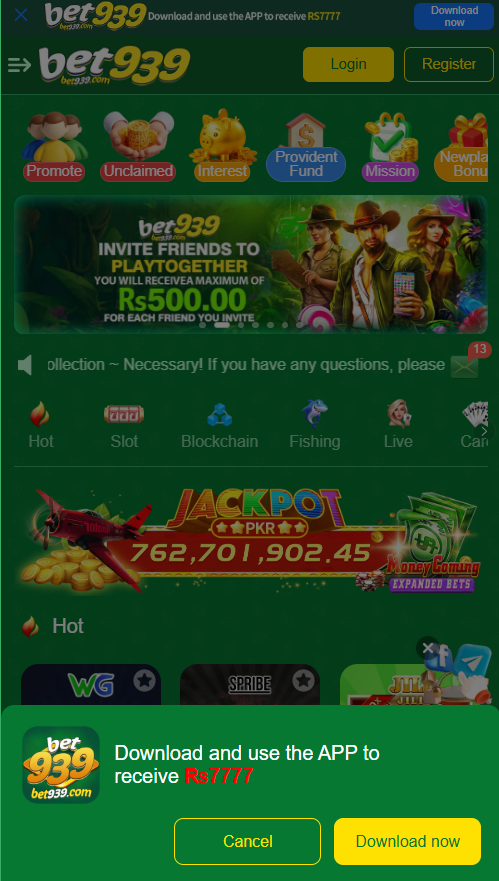
Why the App Isn’t on Google Play Store
Google Play Store doesn’t list real money gaming apps in Pakistan. This is a policy rule that applies to every platform in this category — not something specific to this one.
Downloading outside the Play Store is fine as long as the source is correct. Modified APK files circulate in Pakistani WhatsApp groups and third-party sites — these harvest your login and JazzCash or EasyPaisa credentials. One address: bet939games.net.pk. Nothing else.
How to Download Bet939 APK on Android
Android is where the full app runs. The download and install process takes about five minutes on a normal connection.
Step 1 — Turn On Unknown Sources
Android won’t install files from outside the Play Store unless you tell it to. One setting, one tap. Where to find it depends on which Android version you’re on:
Android 8 and above: Open Settings, go to Apps (or Application Manager), find the browser you’re using to download — Chrome, Firefox, whatever. Tap it, look for Install Unknown Apps or Install from this source, turn it on. Done. This only applies to your browser, nothing else.
Android 7 and below: Go to Settings, then Security. Find Unknown Sources and toggle it on. You’ll get a warning — tap OK. This covers all sources rather than being app-specific.
This is a one-time step. You can leave it on — it has no effect on the rest of your phone. You’ll be glad it’s already done when the next update comes around.
Step 2 — Download the APK
Step 3 — Install the App
First time opening the app it may ask for permissions — storage, network access. Grant whatever it requests. These are standard for any gaming app and nothing unusual.
How to Verify Your Download is Safe
Before installing any APK downloaded outside the Play Store, a quick safety check takes 30 seconds and removes doubt. Pakistani gaming communities have a real problem with modified APKs — files that look and function like the real app but record and transmit your login credentials to third parties.
Three things confirm your file is clean. First, it came from bet939games.net.pk. Second, the filename matches what the site labels it. Third, the file size is close to 33MB — files significantly smaller or larger are a red flag.
If you downloaded from anywhere other than the official site and aren’t certain it’s clean, delete it and re-download from bet939games.net.pk.
Download on PC — Emulator Method
The platform doesn’t have a native Windows or Mac app. PC access runs through an Android emulator — software that creates a virtual Android phone on your computer. The full app experience works inside it.
PC Installation Steps
- Download an Android emulator on your PC — LDPlayer, BlueStacks and MEmu all work well for Pakistani users. Get it from the emulator’s official website, not a random download link.
- Install the emulator and complete the initial setup. It asks you to sign in with a Google account — use any Gmail.
- Inside the emulator, open the built-in browser or a browser you’ve installed.
- Go to bet939games.net.pk and download the APK from inside the emulator’s browser.
- Once it finishes downloading inside the emulator, tap the APK file to install it. Same as you would on a phone.
- Open the app, log in or register, and you’re in.
Your account works across phone and PC. Balance, game history and bonuses are all tied to your account — not the device. Log in from the phone one day, the emulator the next, same account.
iPhone — No Download Required
No iOS app. Apple doesn’t allow real money gaming apps on the App Store, and the alternative install method (sideloading) is more hassle than it’s worth for most people.
Open Safari on your iPhone and go to bet939games.net.pk. The browser version of the platform covers everything — registration, all game categories, deposits and withdrawals.
Want it on your home screen anyway? Open bet939games.net.pk in Safari, hit the Share button, tap Add to Home Screen. Sits right there on your screen like any app.
How to Update
New versions drop without any push notification — there’s no Play Store to ping you. You’ll know it’s time when games start glitching, the app slows down, or something that used to work doesn’t anymore.
Update Without Losing Your Account
1. Go to bet939games.net.pk and download the latest APK — same process as the original.
2. Installing a new APK on top of the existing one works as an update — Android figures it out. Your account stays where it was.
3. If that fails: go to Settings, find the app, uninstall it. Then install the new APK from scratch.
4. Open the app and log in with your existing credentials. Balance, game history and bonuses are stored on the server — not the app — so nothing is lost.
Slow games, broken features, random crashes — nine times out of ten that’s a version problem. Fresh APK from bet939games.net.pk sorts it out.
After Downloading — What to Do First
The five minutes after installing matter more than most players realise. Four things done in order get your account set up properly before you play anything.
Register immediately: Create your account as soon as the app opens. Have your Pakistani mobile number ready for OTP verification. If someone referred you, find their referral code before finishing registration — it can’t be entered afterward.
Claim the welcome bonus: Go to the Promotions section before making any deposit. The welcome bonus for new accounts is available immediately after registration and may require manual activation. Check what’s currently active before you deposit.
Submit CNIC verification: Go to account settings and upload your CNIC photo. This is required before any withdrawal processes. Do it now — not when you have winnings waiting and discover the account is unverified.
Test with a small amount first: Put in PKR 300, play a couple of rounds, then withdraw it to JazzCash or EasyPaisa. The same cautious approach applies to platforms test the minimum deposit and withdrawal before committing more money.
Begin with the minimum amount and test the basic account process. If you also want to compare the setup process with another platform, read this beginner-friendly 1ppp guide.
Download and Installation Problems — Quick Fixes
APK Download Not Starting
Tap the download button and nothing happens? Check your connection, swap to a different browser, or flip from mobile data to Wi-Fi. If the site won’t load at all, your carrier might be blocking it — a VPN gets around that.
‘App Not Installed’ Error
‘App Not Installed’ is almost always one of three things: Unknown Sources isn’t on for the browser you downloaded with, your phone’s storage is too full (you need about 100MB free), or the download got corrupted somewhere. Delete the file, re-download on Wi-Fi, try again.
App Opens Then Immediately Crashes
Long-press the app icon and try clearing the cache first. Still crashing? Check you’re running Android 5.0 or above — that’s the floor. Below that it won’t run. A corrupted download can also cause this — fresh install from bet939games.net.pk usually fixes it.
Old Version Still Running After Update
App showing the old version number after you installed the update? The install didn’t take properly. Fully uninstall the old version, restart your phone, then install the new APK. That restart matters — skip it and the same thing can happen again.
Final Thoughts
Download takes five minutes: bet939games.net.pk is the only correct source, Unknown Sources needs to be on, and the 33MB file installs in about 30 seconds once downloaded. PC users need an emulator, iPhone users use Safari on the official site.
Right after installing: register, hit the Promotions section for your welcome bonus, drop your CNIC into account settings, and run one test deposit and withdrawal before putting in real money. Twenty minutes of setup, zero surprises later.