Bet939 login works in under a minute once you know the steps. Open the app, tap Login, type your phone number and password — you’re in. This guide covers every situation that gets in the way: wrong device, forgotten password, locked account, OTP that won’t arrive.
This guide covers the Bet939 login process completely — step by step for Android, PC browser and iPhone, the two different ways to log in (phone number and username), how to reset a forgotten password, what happens when your account gets locked and how to unlock it, common login problems with specific fixes, and the security habits that protect your account and the JazzCash or EasyPaisa wallet linked to it.
Bet939 Login — Quick Reference
| Login Method | Steps | Works On |
| Phone Number + Password | Enter +92 number and password, tap Login | Android app, browser, iPhone Safari |
| Username + Password | Enter username and password, tap Login | Android app, browser, iPhone Safari |
| OTP Login | Enter phone number, receive OTP, verify | When password is unavailable |
| Forgot Password | Tap Forgot Password, OTP or email reset | All devices |
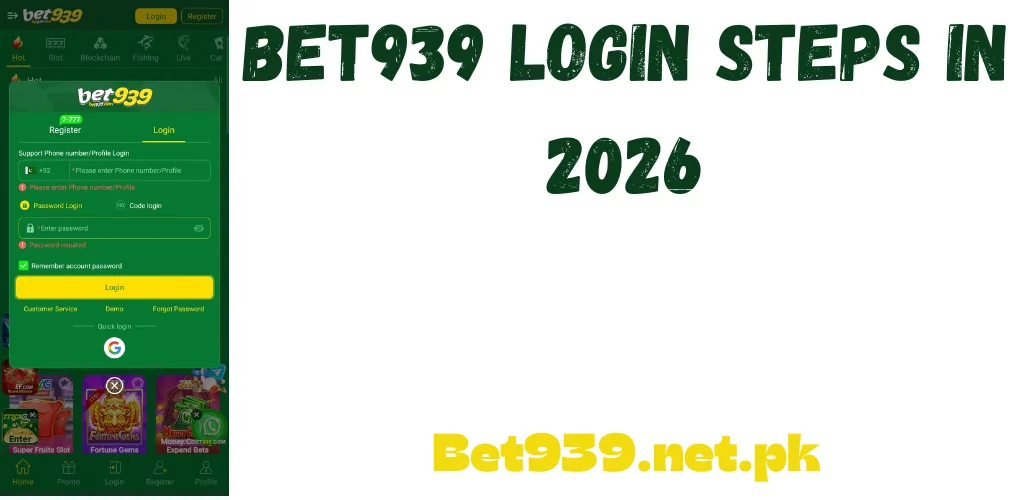
How to Log In on Android
The Android app is where most Pakistani players log in. The process is fast once you have the app installed. Download the APK from bet939games.net.pk if you haven’t already.
Login Steps on Android
Everything’s on the dashboard once you’re in — balance, games history, bonuses, referral earnings. Most devices stay logged in between sessions, so you won’t be doing this every single time.
How to Log In on PC
Players who prefer a bigger screen can log in through any PC browser — Chrome, Firefox, Edge. No emulator required for basic login and gameplay.
Browser Login Steps on PC
For a full native-app experience on PC — where the app interface runs rather than the browser version — you can install an Android emulator and run the APK inside it. But for most Pakistani players the browser login is sufficient and faster to set up.
How to Log In on iPhone
No dedicated iOS app exists. iPhone users log in through Safari browser on bet939games.net.pk.pk. The process is the same as PC browser login.
- Open Safari on your iPhone and navigate to bet939games.net.pk.pk.
- Tap Login at the top.
- Same phone number and password you always use.
- Tap Login. Your account loads in the browser.
To make future logins faster on iPhone: tap the Share button in Safari and select Add to Home Screen. This creates a shortcut icon that opens the login page directly.
Phone Number Login vs Username Login
The platform supports two login methods — phone number and username. Both work equally well. The difference matters when you’re trying to remember which one you registered with.
Phone number is how most Pakistani players sign up, so that’s what they use to log in. If you created a username during registration and still remember it, that works on the login screen too.
Not sure which you used? Try your phone number — nearly every Pakistani account uses it as the main login because it’s linked to JazzCash and EasyPaisa anyway.
Forgot Your Bet939 Password — Complete Reset Guide
A forgotten password is what keeps most players locked out. Two minutes to fix it — follow these steps.
Password Reset via OTP
- Tap Forgot Password on the login screen. It’s right under the password box.
- Enter the phone number or email you signed up with.
- A code gets sent by SMS to your registered number. Open your messages and find it.
- Enter the code quickly — it expires within minutes, not hours.
- Set a new password. Minimum eight characters, mix it up with letters and numbers.
- Go back to the login screen, use your new password, and you’re in.
No code arriving? Give it a full 60 seconds first — networks are slow sometimes. Then try switching between mobile data and Wi-Fi, that often clears the blockage. Still nothing after two tries? Contact support.
Password Reset via Email
Email user? The reset link goes there instead of your phone. Spam folder is the first place to check if it doesn’t show up. The link expires in 15 to 30 minutes, so don’t let it sit there.
Account Locked — What to Do
Entering the wrong password multiple times in a short period triggers an automatic temporary lock. This is a security feature designed to block unauthorised access attempts — it’s not a ban or suspension.
Account Locked — Too Many Wrong Attempts
Five wrong password attempts in a row and the account holds for 30 minutes. The screen tells you it’s unavailable. Stop trying — each new wrong attempt keeps adding time to the lock. Either wait it out, or use Forgot Password to reset now and skip the countdown.
Account Suspended vs Temporarily Locked — The Difference
The hold clears on its own after 30 minutes. Still can’t get in after that with the right password? That’s a suspension, not just a temporary lock. Get in touch with support through the official live chat.
OTP Login — When to Use It
Some app versions let you skip the password entirely — just put in your phone number and verify with a code instead.
This option shows up on the login screen next to or just below the password field. Don’t see it? The app might need an update. OTP login came in with newer releases. If it’s still not there, Forgot Password is your route.
Daily Login Bonus — Why Logging In Every Day Matters
Beyond accessing your account, logging in every single day earns the daily login bonus — automatic bonus credits that accumulate with consecutive logins.
The daily login bonus requires you to actually open the app and log in — it doesn’t trigger from just having the app installed. Players who log in every morning as a habit earn meaningfully more bonus credit over a month than those who log in only when they want to play. The difference between claiming 30 consecutive daily bonuses versus 10 scattered ones across a month is significant in cumulative PKR credits.
Login Security — Protecting Your Account
The account is linked to real money — JazzCash and EasyPaisa deposits and withdrawals run through it. The security habits that protect your gaming account also protect your mobile wallets.
Password Best Practices
Use a password that is unique to this platform and not shared with your JazzCash, EasyPaisa, email or any other account. If your JazzCash account gets compromised and you use the same password here, your gaming balance becomes accessible too.
Never Share Your Login Details
Real support agents never ask for your password. Never share your username, password or OTP with anyone — not friends, not family, and especially not anyone claiming to be from support in a gaming group.
Log Out When Sharing Your Phone
Sharing your phone with someone? Log out when you hand it over. Your unlocked phone is a direct pass into your account, balance and linked wallets. Logging out takes a few seconds.
Watch for Fake Login Pages
Phishing sites that look identical to the real login page circulate in Pakistani gaming groups. These fake pages capture your credentials and immediately use them. Always log in by typing bet939games.net.pk.pk directly in your browser.
Common Login Problems — Quick Fixes
Wrong Password Error
Tap the eye icon so you can actually read what you’re typing — typos cause more login failures than forgotten passwords. CAPS LOCK being on silently ruins passwords. If you have more than one number, try each one.
OTP Not Arriving
A full minute before you request another code — SMS isn’t instant when networks are busy. Then check you have signal, and make sure your inbox isn’t full. Old phones that hit inbox capacity just stop accepting messages. Still no code after two attempts? Switch networks or reach out to support.
Login Page Not Loading
Load any other website to check your connection. Page shows blank? Clear the browser cache and reload. If the site itself seems down, the official Facebook and Telegram channels will have an update.
App Crashes at Login
Login crashes almost always mean an outdated app. Download the latest version from bet939games.net.pk.pk and install it. A clean fresh install from the official source fixes this almost every time.
Final Thoughts
Bet939 login is straightforward on every device — Android app, PC browser and iPhone Safari all follow the same basic process. Phone number plus password, tap Login, and you’re in. The situations that require more steps — forgotten passwords, account locks, login on a new device — all have clear fixes covered in this guide.
Use a strong unique password, log out when sharing your phone, only access the platform through bet939games.net.pk.pk, and log in every day to claim your daily bonus streak.