Bet939 deposit takes about two minutes through JazzCash or EasyPaisa — open the wallet section, select your method, enter the amount, transfer from your mobile wallet, and the balance updates. Bank transfer takes a little longer depending on processing time but follows the same basic structure.
Three things trip Pakistani players up during deposits: not completing the transfer within the session window (deposits have a timeout), depositing before checking for a first deposit bonus offer, and name mismatches between the gaming account and payment wallet. This guide covers all three alongside the full step-by-step process for each payment method and fixes for when a deposit doesn’t show up.
Deposit Methods Overview
| Method | Speed | Min Deposit | Best For |
| JazzCash | Instant — seconds | Rs 300 | Fast deposits, most widely used |
| EasyPaisa | Instant — seconds | Rs 300 | Alternative to JazzCash, same speed |
| Bank Transfer | Minutes to hours | Rs 500+ | Larger deposits, no wallet balance needed |
JazzCash and EasyPaisa both credit instantly once the transfer goes through. Bank transfer timing depends on the bank — most process within a few minutes during working hours, slower on weekends and late nights.
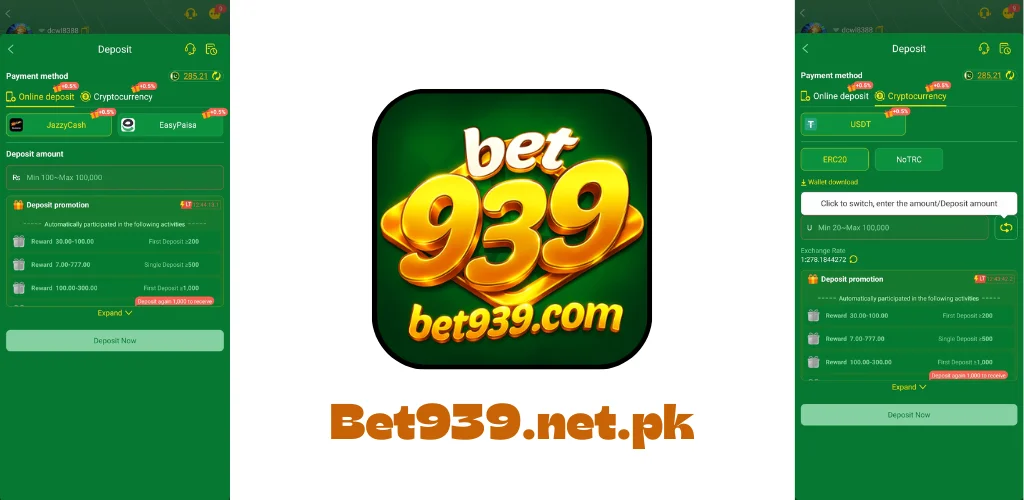
How to Deposit via JazzCash
JazzCash is the most commonly used deposit method among Pakistani players. Here’s exactly how it works:
JazzCash Deposit — Step by Step
- Open the Bet939 app and log in to your account.
- Tap Wallet at the bottom of the screen or from the main menu.
- Tap Deposit.
- Select JazzCash as your payment method.
- Enter the amount you want to deposit. Check it meets the minimum (Rs 300). The maximum per transaction is shown on the deposit screen.
- The app shows you a JazzCash account number and a reference code. Do not close the app at this point — you have about five minutes to complete the transfer before the session expires.
- Open your JazzCash app on the same or a different phone. Go to Send Money or Mobile Wallet Transfer. Enter the account number shown in Bet939, the amount, and the reference code if there’s a field for it.
- Confirm the transfer in JazzCash using your PIN.
- Go back to the Bet939 app. Your balance should update within a few seconds to a minute.
The five-minute window is critical. If you take longer than that between seeing the account number and sending the transfer, the session expires. You’ll need to start a new deposit session — which generates a fresh account number and a new reference code. Don’t use the old one.
JazzCash Deposit Tips
Save the account number: Copy the account number the moment it appears. Don’t rely on memory or screenshots that might take too long.
Transfer exact amount: Send exactly what you entered in the deposit form. Sending more or less can delay the credit or cause it to go to a pending review.
Check JazzCash balance first: Make sure you have enough balance in your JazzCash wallet before starting the deposit session. Running short mid-process wastes the session window.
How to Deposit via EasyPaisa
EasyPaisa deposit follows the same structure as JazzCash. If you use EasyPaisa as your primary mobile wallet, this is the more natural choice.
EasyPaisa Deposit — Step by Step
- Log in to Bet939 and go to Wallet, then Deposit.
- Select EasyPaisa as your payment method.
- Enter the deposit amount (minimum Rs 300).
- The app gives you an EasyPaisa account number. Same five-minute window — start the transfer immediately.
- Open your EasyPaisa app. Go to Send Money. Enter the account number, amount and any reference code shown.
- Confirm with your EasyPaisa PIN.
- Check your Bet939 balance — it should update within seconds.
EasyPaisa and JazzCash work identically for deposits. The only practical difference is which wallet you already have money in. No speed difference, no extra steps.
How to Deposit via Bank Transfer
Bank transfer works for players who want to deposit a larger amount, don’t have a JazzCash or EasyPaisa wallet, or prefer to move money directly from a bank account.
Bank Transfer Deposit — Step by Step
- Log in to Bet939 and go to Wallet, then Deposit.
- Select Bank Transfer as your payment method.
- Enter the deposit amount. The minimum for bank transfer is typically higher than mobile wallets — check the current amount shown on screen.
- The app shows you bank account details — account number, bank name, account title and a reference or order number.
- Log in to your bank’s mobile app or go to an ATM. Transfer the exact amount to the account details shown. Include the reference number in the transfer remarks if your bank has that field.
- Take a screenshot of the completed transfer confirmation from your bank.
- Back in Bet939, submit the transfer proof if the app asks for it — some bank transfer flows require this step.
- Processing typically takes a few minutes to a few hours. If it hasn’t reflected after three hours, contact support with your bank transfer reference number.
Bank transfers take longer than mobile wallets but handle larger amounts more reliably. Use JazzCash or EasyPaisa for day-to-day deposits. Bank transfer for larger one-time deposits.
Bet939 Deposit Limits
| Method | Minimum | Maximum Per Transaction | Daily Limit |
| JazzCash | Rs 300 | Rs 25,000 | Check app — varies by account level |
| EasyPaisa | Rs 300 | Rs 25,000 | Check app — varies by account level |
| Bank Transfer | Rs 500 | No fixed cap | Bank dependent |
The limits shown in the app are the actual current limits — they can change. VIP account holders often have higher per-transaction and daily limits. If the limit you see in the app is lower than what you want to deposit, contacting support to discuss your account tier is the fastest route.
First Deposit Bonus — How Timing Changes Your Starting Balance
Before making your first deposit, check the Promotions section of the app. The first deposit bonus matches your deposit by a percentage — that percentage varies and occasionally increases during festival promotions, PSL season or special events.
The first deposit match is a one-time offer. It applies once to the first deposit ever made on your account. A 100% match on Rs 1,000 gives Rs 2,000 total. A 200% match on Rs 1,000 gives Rs 3,000 total. If you deposit on a normal day and a 200% promotion was running the following day, you’ve permanently missed it — first deposits can’t be reversed and re-done.
Taking 60 seconds to check the Promotions section before depositing is the single highest-value habit a new player can form. It costs nothing and can double or triple the starting balance from the same PKR.
How to Claim the First Deposit Bonus
- Register your account if you haven’t already.
- Go to the Promotions section before touching the Wallet.
- Find the First Deposit or Welcome Bonus offer and read the current percentage.
- If a festival or seasonal promotion is running, decide whether to wait for a better offer.
- When you’re ready, go to Wallet, Deposit, select your method and make the deposit.
The bonus credits to your account automatically in most cases. If it doesn’t appear within a few minutes, go back to Promotions and check if manual activation is required.
Deposit Safety — What Pakistani Players Need to Know
Name Matching
The name on your Bet939 account must match the name registered on your JazzCash or EasyPaisa wallet. Most deposit sessions process automatically without a name check, but some transactions get flagged for review when names differ. If a deposit goes into pending review rather than crediting instantly, a name mismatch is usually why. Matching names from the start prevents this entirely.
Only Use Your Own Payment Method
Deposit from an account registered in your own name. Using someone else’s JazzCash or EasyPaisa — a friend, family member, or anyone else — creates a name mismatch that holds up the transaction and can trigger an account review. If your own JazzCash wallet is empty, top it up from your own bank account first rather than using someone else’s wallet directly.
Keep Your Transaction Reference
Every JazzCash, EasyPaisa or bank transfer generates a transaction reference number. Screenshot it or note it down before leaving the payment app. If a deposit doesn’t reflect, this reference number is what support needs to locate and manually credit the transaction. Without it, the resolution takes significantly longer.
Deposit Not Showing — Quick Fixes
Balance Didn’t Update After JazzCash or EasyPaisa Transfer
Wait three minutes first — occasional delays happen on busy networks. Pull down to refresh your balance screen. If it’s still not there after five minutes, check your JazzCash or EasyPaisa app and confirm the transfer status shows as Successful rather than Pending or Failed. If the transfer succeeded on the wallet side but the balance hasn’t updated, contact support immediately with the transaction reference number and a screenshot of the successful transfer.
Deposit Session Expired Before Transfer
If you didn’t complete the transfer within the five-minute window, the session expired. Don’t try to send money to the old account number — that session is closed. Start a fresh deposit session from Wallet, Deposit. A new account number and reference code generate. Use those for the transfer. If you accidentally sent money to an expired session’s account number, contact support with proof of transfer — they can locate and credit it manually.
Sent Wrong Amount
If you sent more or less than the amount entered in the deposit form, contact support immediately with your transaction reference. Overpayments and underpayments both need manual review. Don’t start a second deposit session for the difference — wait for support to resolve the first transaction.
JazzCash or EasyPaisa Showing Insufficient Balance
Top up your JazzCash or EasyPaisa wallet before starting a deposit session. You can top up a JazzCash wallet at any Jazz franchise, bank ATM with the top-up option, or through bank transfer to your JazzCash account number. EasyPaisa top-ups work the same way through Telenor franchises, ATMs and bank transfers.
How to Check Your Deposit History
Every deposit is logged in your account. To view deposit history: go to Wallet, then look for Transactions, History or Statement — the label varies by app version. The transaction log shows every deposit, the amount, the method used, the date and the status. If a deposit shows as Pending for more than 30 minutes, that’s a signal to contact support.
Final Thoughts
Bet939 deposit is fast through JazzCash and EasyPaisa — the balance reflects within seconds of a successful transfer. The main things to remember: check the Promotions section for a first deposit bonus before making your first deposit, complete the transfer within five minutes of the session starting, use an account in your own name that matches your gaming account, and keep the transaction reference number from every transfer.